Fixing a Mailgun API unknown domain error

I’m using the Mailgun API for a couple of clients, making sure we don’t keep sending email to someone who has marked their previous message as spam.

It should be quite simple to use as the docs are very clear, but I kept getting an ‘unknown domain’ error in the returned message when I used the API with one of my client’s domains rather than the sandbox domain the Mailgun provides.

The fix was to use the EU address for the API: api.eu.mailgun.net rather than the standard api.mailgun.net. As my clients are in the UK, they are put into the EU servers, rather than the American ones.

I didn’t find a simple suggestion to do that, so I’m writing this so I find it next time this trips me up.

Fixing minor issues moving code from Railo to Lucee ColdFusion

I have a couple of personal projects at a host that offers the ColdFusion web programming language. I have a soft spot for ColdFusion as its my first programming language and I still find it very easy to put together sites in it as it comes with easy to use functionality the other server side language I use a lot, PHP, only gets through frameworks where they’ve been added by others.

Adobe, current owners of the official ColdFusion engine, charge rather a lot for licenses and that has a knock on effect on the price of hosting. So, I use Viviotech, who offer the open source engines that run the ColdFusion language. The popular one of those was Railo and is now Lucee. Viviotech recently shifted my sites onto Lucee, which I’d been meaning to try as Railo is old and now discontinued.

I hit a couple of problems:

Gotcha 1: No CGI.PATH_INFO

In the project, I redirect all requests through a single routing file. Within that file, I was using CGI.PATH_INFO to get the path of the page being requested. That stopped working, which turns out to be because the host is using Nginx and that doesn’t have PATH_INFO turned on by default. There are ways of making it work, but I didn’t want to be doing support requests to do that and it may not have been accepted for my cheap-as-chips hosting package.

Instead, I make the redirect in the .htaccess file send the path through for me.

My redirect went from this:
RewriteRule ^(.*)$ ./routing.cfm/$1 [L]
To this:
RewriteRule ^(.*)$ /routing.cfm?path=$1 [NC,L,QSA]
Which gives me the URL of the page being requested in URL.path (apart from the / that is normally at the start, which I needed in part of my URL detection, so I added it on.)

I re-wrote my code to use the new URL.path (with added /) instead of CGI.PATH_INFO and that got it working again.

Gotcha 2: Saving files needs permissions set

In one of the sites, I get an image from an API that makes screenshots, and save it locally so I don’t have to use the API over and over. That means getting the image using CFHTTP, then saving it using CFFILE.

That worked, but I couldn’t open the files. The fix was to use MODE=”644″ within CFFILE. This set the file permissions so the image file can be read by the world, and show up on a web page.

<cffile
action = "write"
file = "<path><filename>"
output = "#cfhttp.fileContent#"
mode="644">

Improvement: Can read SSL protected RSS feeds

Railo couldn’t read RSS feeds that were protected by Let’s Encrypt SSL certificates and some of the other cheap/free SSL providers. Lucee can.

That’s great, as I made a very basic proxy (not really worthy of the word) to go request the SSL protected RSS feed through a PHP script I had on some other hosting, which would then send it through without SSL. Not great for security (although these are all public posts it is reading.) So the update to Lucee let me remove the ‘proxy’, which has simplified my code and maintenance.

Now I have my sites working again, I’m looking forward to delving into Lucee some more.

Fixing Vagrant VMs after a VirtualBox upgrade

I use virtual machines to split up my web development projects. This lets me have a small Linux server run inside my Mac, allowing me to match the operating system with what the code will run in on a public service, without going all the way to running Linux all the time. As I want an easy life when it comes to setting these up, I use Vagrant to make and manage the virtual machines within VirtualBox, which runs them for me.

Recently I set up an extra Vagrant virtual machine (VM) to hold two projects for a client and keep them separate from some of my own projects, as they needed particular settings within Linux and a different database server to run them than the settings and database for my own projects.

I used a Homestead VM, as I knew the settings were good. Homestead is made for Laravel PHP sites, but is perfectly valid for lots of other PHP projects. My client uses various versions of the Symfony framework, and they work fine within Homestead built boxes.

The new VM worked fine but the existing VM stopped working. I could start it, I could SSH into it, but I couldn’t get any websites from it to show in the browser. Which is a big problem, as that’s all it is there for.

After much faff and investigation, I discovered the problem is a bug in the current version of VirtualBox. I had updated it while setting up the new VM, but unlike previous upgrades, this caused a problem. VirtualBox needs VMs to use IP addresses within the 192.168.56.0/21 range or the “bridge” between MacOS and the virtual machine doesn’t work, so no web pages show.

The IP of the old Homestead box my own projects were in was 192.168.10.10, which was the default when I installed it. That used to work, but now does not. The new VM uses 192.168.56.4, which is within the allowed range, so it worked fine.

To fix the old VM:

I had to edit the Homestead.yaml file. At the top where it says:

ip: "192.168.10.10"

I changed it to:

ip: "192.168.56.10"

I then ran:

vagrant reload --provision

To get vagrant to reconfigure the existing Homestead box to use this changed IP address, without deleting anything inside the VM.

And finally I edited the entries in my hosts file (which is in /etc for me in MacOS) for the websites in the VM, changing their IP from 192.168.10.10 to 192.168.56.10

Once all that was done, the websites in the VM started working again.

This was a very, very frustrating problem. I spent a long time investigating what was happening inside the VM as I presumed that’s where the problem was, eventually stumbling on the solution after searching for wider and wider versions of the problem. Thanks to Tom Westrick whose post on Github got me to the solution.

Keeping on top of spam in a smallish sub-Reddit

I moderate a small part of Reddit for UK freelancers. As we grow in size, more spam and other rule breaking posts get submitted to the group. Spam is annoying in general, but I particularly didn’t want it hanging around in the sub-Reddit as spam breeds more spam as others realise their posts will stick around, and I didn’t want people checking the group, seeing the spam and deciding either it’s dead or we just don’t care about it. If a spam post is flagged as spam by members, it will disappear if enough different people flag it, but as a small group there aren’t enough people being that diligent and as the person running the group it falls to me to remove the posts and potentially ban the person who sent it in from posting to the group again.

I had been checking the group once a day, but sometimes forgot, or if I was unlucky, a spam post would be hanging around for almost a day until I caught it. I wanted to keep on top of the problem, and wanted a warning when a new post was added so I could catch it if it was spam, or help out if it was legitimate and something I could answer.

Each sub-Reddit has an RSS feed of the new posts that come in, for /r/freelanceuk it is https://www.reddit.com/r/freelanceuk/.rss so I knew I could have something read that and send me a warning of new posts. It would be easy to get an email when a new post happens, I already have code that can read a feed and copy it into an email. But, I tend to avoid my email outside of work hours to let my brain relax and not think about work. So, a notification to my phone would be a better alternative.

I tried a phone app (name forgotten, sorry) which said it could do this – read a feed and notify when it changed, but I never received any notifications. So being a programmer, I looked at writing my own, using a service like Truepath to do the notifying part. While I got notifications working briefly, I couldn’t get it working longer term, maybe because it was set up to trigger to a browser and I wasn’t opening that enough to keep it active? Anyway, I was back to square one.

Having asked on the Farm mailing list whether anyone knew of a phone app for Android which would do what I wanted, Julian suggested I use an RSS reader like Feedly to do it, and Mike that I use IFTTT, which he uses to do other things with RSS feeds but supports notifications too.

I’ve used IFTTT in the past and found it a bit awkward and hit and miss, and was getting fed up of thinking about this problem by now and just wished Reddit would let a moderator get a notification on new posts within their sub-Reddit natively. So, I tried a couple of RSS readers instead, looking for small and light ones that didn’t require subscriptions.
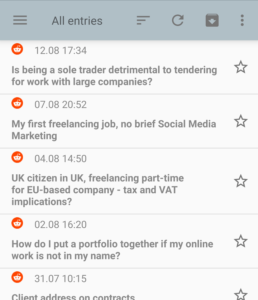
RSS Reader listing several stories from freelanceUK sub-RedditThe one that has worked well is the bluntly titled RSS Reader, previously “Simple RSS Reader.” I have it set to check for updates every half an hour and it has worked great. Now, soon after a post is made I get a notification on my phone that one is waiting, pressing that opens RSS Reader and from there I can press through to the website, or just open BaconReader, my preferred app for reading Reddit, and go to that section as normal.

I’ve got the notification vibration turned off, as I don’t want to be disturbed when I’m concentrating on work, but I still check my phone often enough that I’m catching any spam pretty quickly. Also, I’m helping people more quickly too as I’m seeing their posts while they’re still fresh.

So, thumbs up to RSS Reader and it’s creator, Svyatoslav Vasilev!

Fixing a download link downloading the same file when it should be dynamic

One of my clients, the Database of Pollinator Interactions allows researchers to easily search on which insects and mammals pollinate which plants. To make it simple for researchers to gather the references to papers they need to look up, their website allows downloading of search results as a CSV file.

This is powered by a little bit of AJAX, when a searcher clicks the download button, Javascript calls on a PHP script which reads the search filters out of a cookie, compiles the results into a comma separated file, and lets you download it.

However, the site had a bug (no pun intended). If you ran a search and downloaded the results, then ran a different search and downloaded the results, you got the same file of results, even if the search was completely different and the results shown on the page were correct for the search.

This turned out to be because the live server was set up to cache pages where possible, whereas my development server was not. The call to the script that made the file was on a URL that did not change, as it read what it required from a cookie. So the browser thought it was hitting the same URL each time the download button was pressed, so to help speed things up served up the file for download from its cache, rather than requesting a new one from the website.

The fix for this was quite straightforward. In the PHP script that received the call from Javascript, I added these headers at the top of the code:

header("Cache-Control: no-store, no-cache, must-revalidate, max-age=0");
header("Cache-Control: post-check=0, pre-check=0", false);
header("Pragma: no-cache");

Having them all is probably overkill and I should go back and find which one really does the job for them.

This makes the script send headers when the browser requests the URL saying not to cache what is sent back. So the browser will request it fresh each time the URL is called.

Now, when the button is pressed, a new CSV is always requested rather than the browser providing the one it has already received. Problem solved.